
Many platforms currently offer free model usage, and Cloudflare's Workers AI is one of the best. Workers AI is Cloudflare's "Serverless + Edge GPU" AI inference platform. It allows you to run large language models and multi-modal models directly on Cloudflare's global edge network without managing GPUs or clusters, billed purely by usage.
Core Features of Workers AI
- Global Edge Deployment, Ultra-Low Latency: Deployed in over 300 edge nodes globally, keeping computation close to the user. Typical response times are <100ms (far lower than traditional centralized cloud AI's 300–500ms).
- 50+ Models Covering All Scenarios:
- Text/Chat: Llama 3/4, Mistral, GLM, Qwen, Gemma, deepseek-r1, etc.
- Image Gen: Stable Diffusion, FLUX, Pixverse.
- Voice/Multimodal: Whisper (speech-to-text), TTS, Video generation.
- Extremely Cheap with Friendly Free Tier:
- Free: 10,000 Neurons per day (roughly equivalent to hundreds of chat turns).
- Paid: $0.011 / 1000 Neurons, up to 60%–90% cheaper than OpenAI. Billed by compute (Neurons) rather than tokens.
- Ideal Use Cases: Chatbots/Customer Service (Llama 3, GLM-4), Content Generation (copy, summaries, translation, code), Visuals (posters, product images), and Voice processing.
How to Setup and Call the API
Follow these steps to get your API key:
-
Register and log in to Cloudflare. On the left sidebar, click AI -> Workers AI.
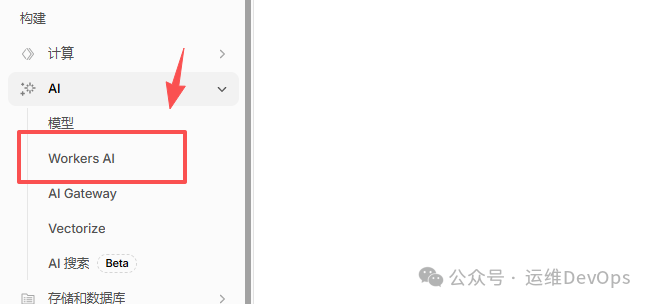
- In the Workers AI dashboard, click Create Workers AI API Token.
- Save the generated token securely. The page will also display your Account ID and provide a sample curl command.
To view available models, click the "Docs" button on the right side of the Workers AI page, then navigate to Models (this list is the most accurate).
Testing the API via cURL
Select a model you want to use (for example, you can test with Qwen, DeepSeek, or Llama). Replace the 账户ID, 模型ID, and APIKEY in the command below:
curl -X POST \
"https://api.cloudflare.com/client/v4/accounts/YOUR_ACCOUNT_ID/ai/run/@cf/YOUR_MODEL_ID" \
-H "Authorization: Bearer YOUR_API_TOKEN" \
-H "Content-Type: application/json" \
-d '{
  "messages": [
    {"role": "system", "content": "You are a friendly assistant that helps write stories"},
    {"role": "user", "content": "Write a short story about a llama that goes on a journey to find an orange cloud"}
  ]
}'
Conclusion
Cloudflare Workers AI's unified API (env.AI.run("model-name", {...})) allows you to swap between models with a single line of code.
Its 10,000 daily Neurons are generous enough for personal daily use, making it the ultimate playground for developers.